

What a Gold Price App Shows, and How to Read It


A gold price app puts the spot price on your phone: what one troy ounce of gold trades for on the wholesale market, updated through the day, with its change beside it. That number is the metal alone. A coin or bar costs spot plus a premium, so a useful app shows the premium too, and ideally what buyers and sellers are actually offering. In the Pure app, the home-screen widget shows spot for all four precious metals plus gold's spot bid and ask, product cards carry a premium-over-spot tag in % or $/oz, and a price alert can fire when a product's highest bid premium moves past a level.
Four prices a gold price app can show you
They sit close together on a small screen and mean different things.
Spot, per troy ounce
Spot is the price for an ounce of metal changing hands in the wholesale market for near-immediate delivery. It moves all day on weekdays. The ounce is always a troy ounce, 31.1 grams against the 28.35 of the ounce on a kitchen scale. For the longer explanation of where spot comes from, see what spot price means.
The spot bid and the spot ask
Spot has two sides. The bid is what the wholesale market will pay for an ounce and the ask is what it will sell one for. Many apps collapse that into one figure. Pure's widget shows both for gold. You see the gap from the home screen.
A product's own highest bid and lowest ask
This one is specific to a marketplace. On Pure, every product has an order book: the highest bid is the most a buyer is currently offering for that exact coin or bar, and the lowest ask is the least any seller will currently accept. Real people set those numbers. They can sit well away from spot. If order books are new to you, how to read an order book walks through one.
Premium over spot
The premium is the gap between a product's price and the metal it contains. Pure shows it on its product cards, as a % or a $/oz figure.
The math is simple enough to do in your head. A 4.8% premium is $48 for every $1,000 of spot. On a 1 oz gold bar, multiply the spot price by 0.048 and that's the premium in dollars. Premiums can also go negative, which is what an under-spot gold listing is: a product priced below the value of its metal.
That is the number to watch if you are comparing two bars of the same weight. Spot is the same for both of them.
What a home-screen gold price widget can tell you
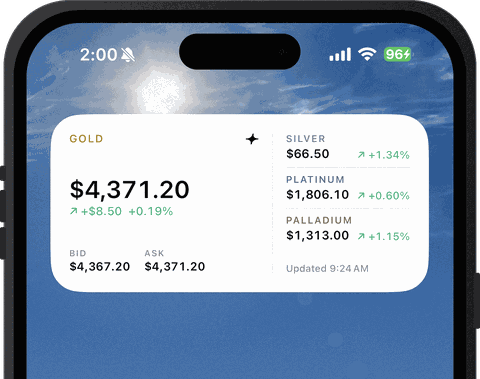
A widget is for the glance. Pure's shows spot for gold, silver, platinum and palladium, each with its change, and gold's spot bid and ask. If you track silver as closely as gold, that makes it a silver price widget too, with no second app.
What it won't show you is what a particular product costs, because it shows spot prices for the metals, not product prices, and a product's price carries a premium on top of spot. For that you open the product page.
Freshness is the other thing to know, and it comes from how iOS widgets work in general. iOS decides when a home-screen widget reloads. Apple's developer documentation says a widget you look at often typically gets 40 to 70 refreshes a day, roughly one every 15 to 60 minutes, though the interval varies. On any iPhone widget, the number is a recent reading. The app and the live gold price chart are where you check the current one.
Apple's guide to adding widgets on iPhone has the steps for your iOS version.
How gold and silver price alerts work
A price alert watches one number and sends a push notification when that number crosses a level. What matters is which number. Some apps can only watch spot. On Pure, an alert can be tied to a product, with the premium on that product's highest bid as the trigger.
Reading a Pure price alert
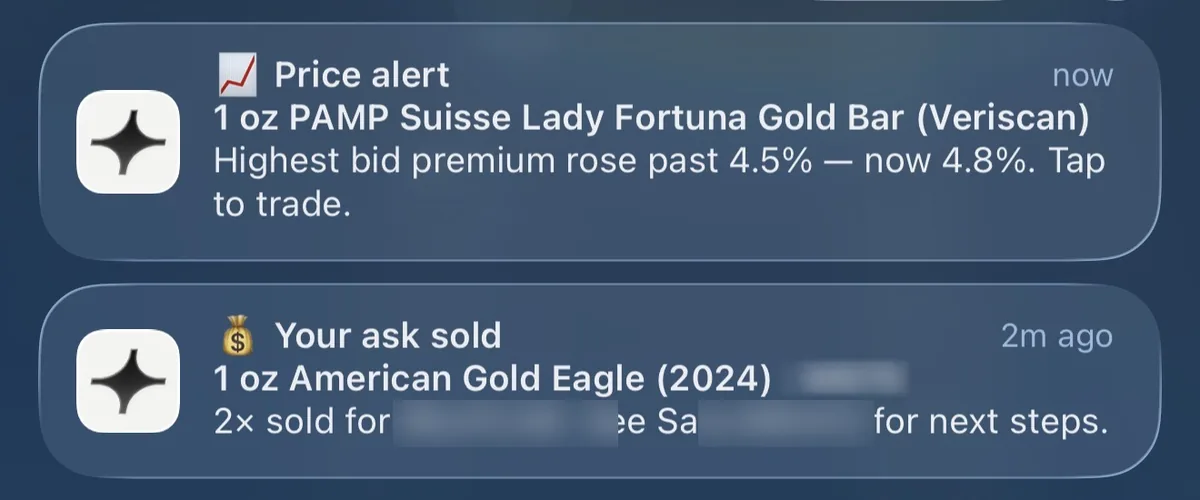
The top notification is a price alert on a 1 oz PAMP Suisse Lady Fortuna gold bar. It reports that the highest bid premium rose past 4.5% and now stands at 4.8%. Taken apart:
Highest bid is the top offer any buyer has posted for that bar on Pure.
Premium is that bid's distance above spot. It rises when bids go up. It also rises when spot drops while the bids hold.
Rose past 4.5% is the level the alert was watching. The push went out on the crossing.
Now 4.8% is where the number was when the notification went out.
A spot-only alert can't tell you any of that. Spot could sit flat all afternoon while bids on one bar climb. Only a product-level alert would catch that.
Setting a price alert in the Pure app
A Pure price alert is set per product, from that product's page, on a sheet titled New Price Alert. It has four fields. What to watch (the sheet shows Lowest Ask Price). The condition, which can be below, above, equals, drops by, or rises by. The amount. And how often to be told: always, which repeats every hour the condition holds, daily, or weekly. Before you create it, the sheet reads the alert back in one line, such as "We'll notify you when lowest ask is below" your number.
Alerts about the market, notifications about your orders
The second notification in that screenshot is a different kind of push: a your-ask-sold notice. The Pure app also sends pushes about your own orders: when your bid or ask is accepted, when an order is matched, at each status step on a buy or a sell, and when a product you favorited comes back in stock. The Pure team also sends announcements, which can include a Pure Priority drop going live.
The app asks for notification permission at your first sign-in. If you said no then, you can switch it on later in iOS; Apple explains how to change notification settings on iPhone.
An alert tells you a number moved. What you do with that is up to you. Nothing in this post is a view on where gold goes next.
What to check before you pick a gold price app
For reading prices, four questions sort most apps out.
Does it show one spot number, or the spot bid and ask?
Can you see a specific product's price with the premium broken out, or only the metal?
Can an alert watch a specific product, or only spot?
Is there a widget, and does it cover silver, platinum and palladium as well as gold?
A tracker is fine if all you want is the number. Buying through an app is a separate set of checks (who tests the metal, how shipping is insured, how fees show up). The gold buying app checklist goes through them.
The Pure app, in short
Pure is a peer-to-peer marketplace for precious metals and rare coins, and its app is on the App Store as Pure: Buy Gold & Silver. It's free, runs on iPhone and iPad with iOS 16.4 or later, and uses the same account as collectpure.com. Your orders and listings are already there when you sign in.
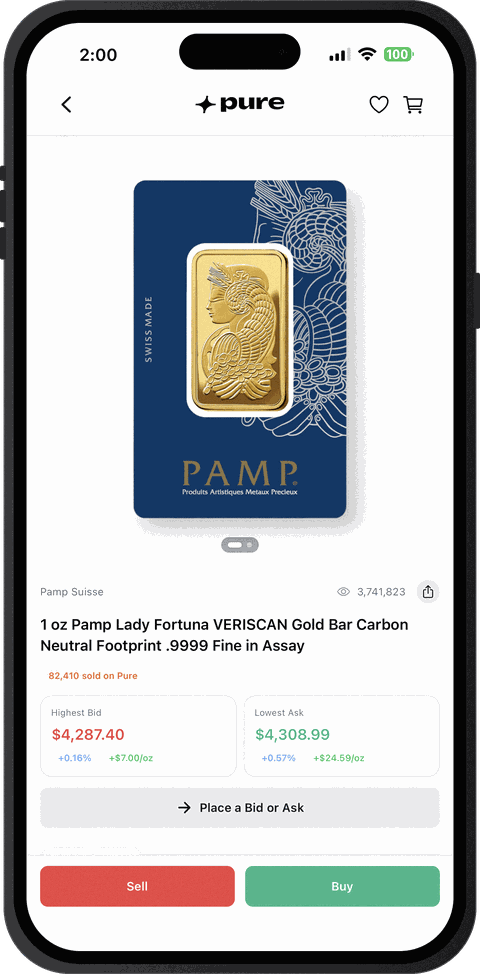
Each product page shows the order book, with the highest bid and lowest ask next to the button to place your own. We test every item ourselves before it ships, and items that pass are Pure Qualified. For everything else the app does, from sign-in to selling, see the full guide to the Collect Pure app.
Gold price app questions
Why does the gold price barely move on weekends?
The wholesale market mostly stops. Gold futures on CME Globex trade from 6 p.m. ET Sunday to 5 p.m. ET Friday, with a one-hour break each day from 5 to 6 p.m. ET, and live spot quotes go quiet outside that window. A flat number on a Saturday means the wholesale market is closed.
Is the price in my app the same as the LBMA gold price?
No. The LBMA Gold Price is a benchmark set in two auctions a day, at 10:30 and 15:00 London time, run by ICE Benchmark Administration; silver gets one, at 12:00. Each auction sets a benchmark that holds until the next. The spot in an app keeps moving in between, so the two will rarely match to the dollar.
Can I see Pure's prices without the app?
Yes. Every product's order book is on collectpure.com in any browser, including on Android, where the Pure app isn't available. The widget and push notifications are the parts that live in the app.