

Tips & Tricks to Start Buying on the Pure Marketplace


Ways to buy on the Orderbook-Style Marketplace
The pure marketplace is the first order book-style marketplace for the rare coins and precious metals community. It is meant for Dealers, Collectors, Wholesalers, and all of the above users to use it to buy and sell their items. The marketplace works exactly like the stock market, with bids and asks being broadcast throughout the entire day across a large range of generic products, which we like to call "tickers". These tickers are in turn traded regularly, where physical metals are moved to fulfill the orders.
Premium-Based Market
Each ticker can have its competitive market for which outside forces can impact the fluctuation of the underlying spot price, or price of commodities gold on the COMEX exchange. This is why Pure functions as a premium-based marketplace, where bids and asks are denoted by percentages over spot, dollars per ounce over spot, or just fixed prices. Premiums allow for hedging of the underlying metal and give our users a more transparent way to understand how much metal content is being owned for the price they are paying.
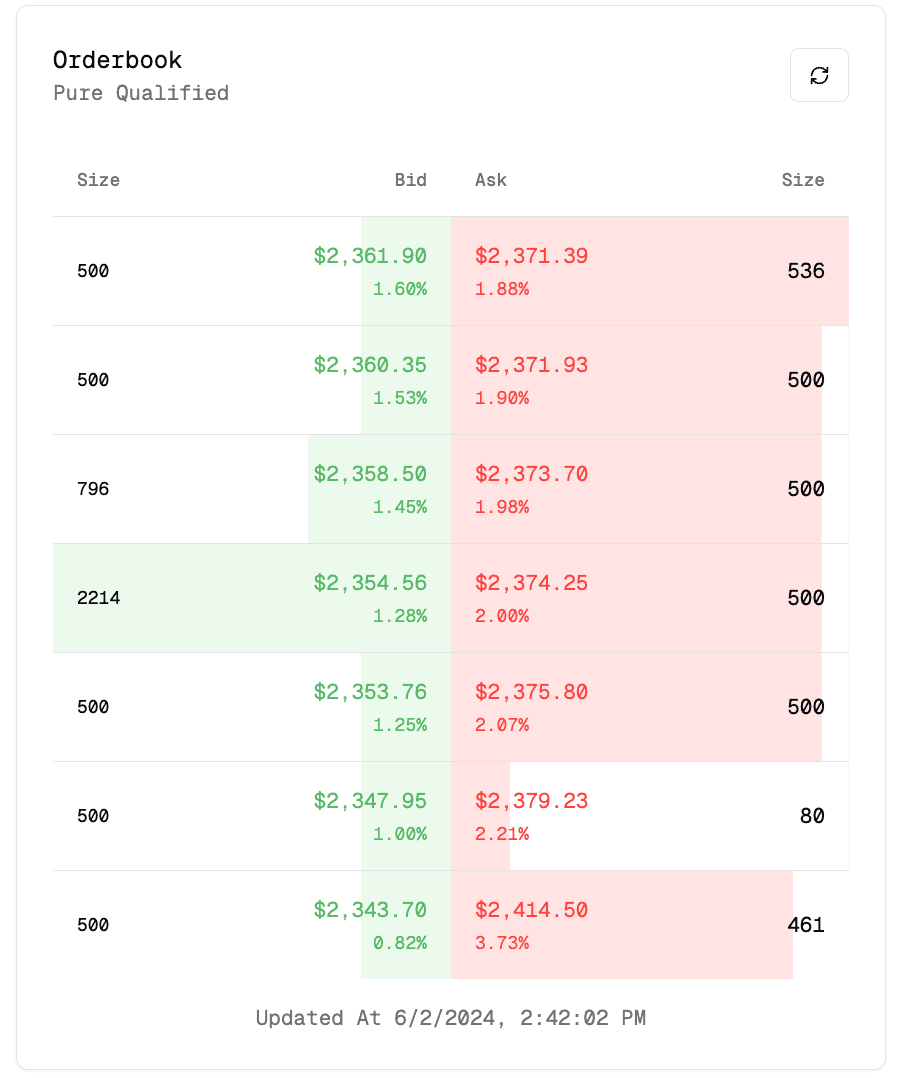
Take the 1 oz American Gold Eagle, for example, the most commonly traded coin in the United States and arguably in the world. As seen above, many different people would like to buy and sell this ticker. Bids are denoted as the green numbers, on the left side of the order book, this is how much you could sell one unit for (pre-fees). Vise-versa, on the right side, is the ask, which is how much you could buy one unit for (pre-fees). Size is the amount of quantity that the active bid or ask is making available at that specific price. Under each value of the bid or ask we place the corresponding premium to make sure each entry is transparent in price, note they are also ordered by ranking their value.
Buying a "Overfilled" Quantity
Now that we understand how the order book style marketplace works, we can dive deeper into the cool features the order book allows for in terms of buying.
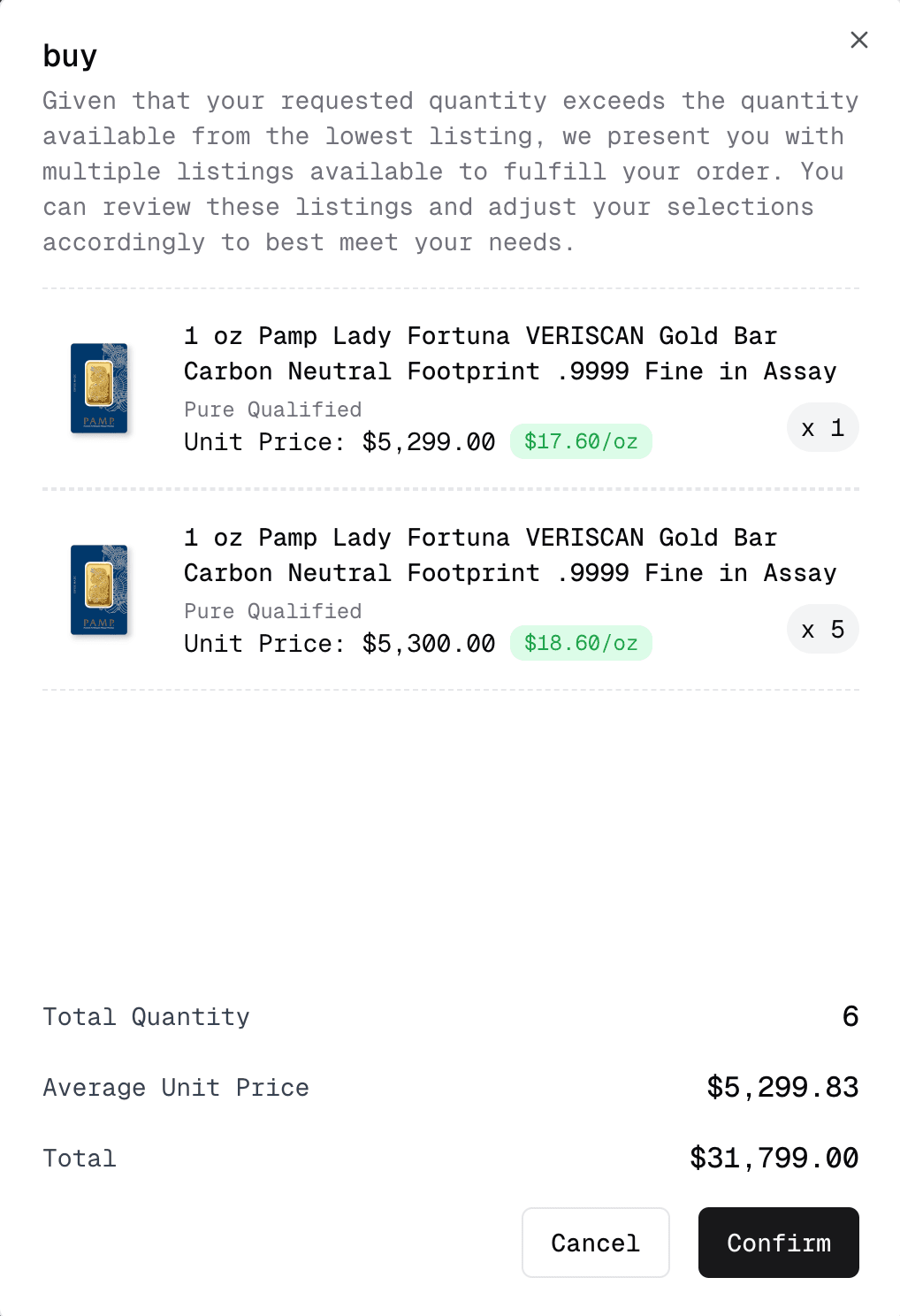
Say you are looking to purchase 6 Pamp Fortuna 1 oz Gold Bars, and the lowest ask in the order book shows only 1 available bids, the system automatically pulls the next available ask to complete the order. This allows for larger orders to be placed and filled depending on how many asks are available in the market.
Placing a bid
Say you've looked over the order book and the current ask is too high for your liking, you may also place a bid, which will show up under the order book. If your bid is the highest, it will show up on the product listing as the highest bid. If your bid is higher than the lowest ask, it will show an error as shown in the image below.
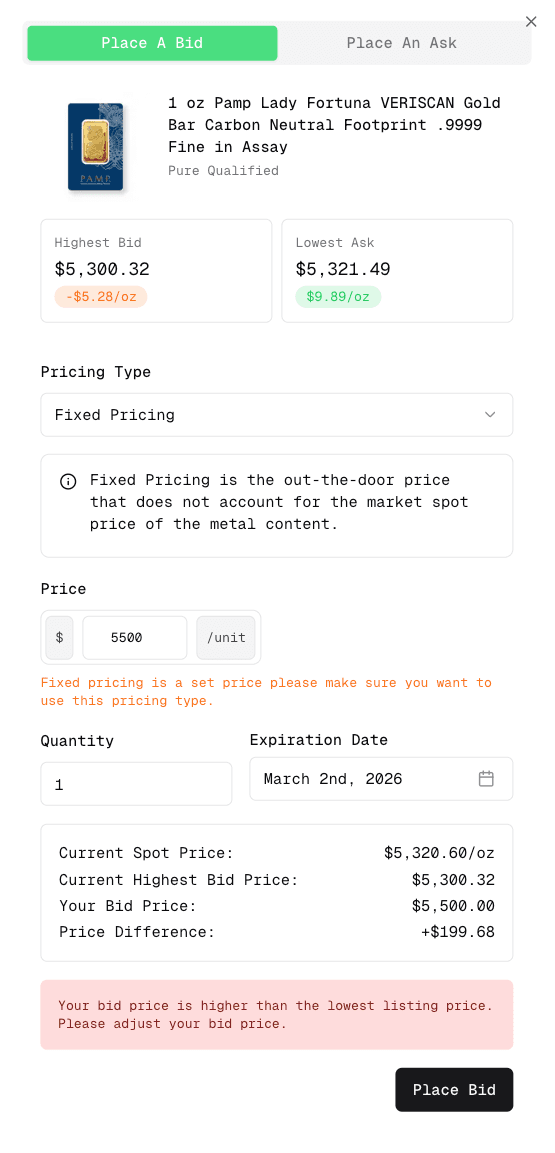
On each product page, below the product's pricing is a feature to be able to place a bid. Once signed in and clicking this box, you can then enter the market for your item using three different types of pricing. You may also place a bid on the dashboard under the offers tab.
Premium Dollar Pricing: Dollar premium is a fixed dollar amount added to the spot price per troy ounce weight of the metal content.
Premium Percent Pricing: Premium percent pricing is the positive markup added to the market spot price of the metal content.
Fixed Pricing: Fixed Pricing is the out-the-door price that does not account for the market spot price of the metal content.
Using these types of pricing, you can hedge the spot price of your metal to ensure you get the premium value that you would like to set. Note that fixed pricing is the out-the-door price that is set, and does not have any hedge associated with it. New: We have disabled Premium Dollar Pricing and Premium Percent Pricing due to users setting their prices incorrectly. To enable the two options, head over to your settings in the dashboard and enable advanced mode. Important Notice: There is a $25 dollar small order fee if your order is below $10,000. There is a chance that your bids may be fulfilled one by one, causing multiple orders instead of one large order. At the moment there is not a minimum bid size acceptance. To avoid having multiple orders, we suggest accepting the lowest ask on multiple items and adding them to your cart so that there is only one fee.
Deactivating Offers
If you have a offer that you would no longer like to have active, you must navigate to the dashboard to be able to cancel this. Under the "offers" tab or this link: https://www.collectpure.com/dashboard/offers each item has a deactivate button that will allow the listing to be canceled. Please note that if you place an bid and later choose to buy by accepting the lowest ask (by clicking the Buy button), your original bid will remain active and will not be automatically removed. You will need to manually remove it.
Support for Buying
As always, please feel free to reach out to support if you have a problem with buying items on Pure. Please do note that market loss is applicable if your payment fails and you do not reach back out to have your order be resolved.